In ADF, Most common used component is table. Previously, I searched for so many blogs, I didn't get any skinning related stuff to fulfill my requirement then I realized and explored myself to learnt. Finally i could accomplish skinning for table component.


af|table af|column::column-header-cell
{
height:35px;
color:#ffffff;
text-align: center;
font-size: 12px;
font-family:'OpenSans-Bold';
font-weight: bold;
background-image: none;
background-color: #A65B1A;
vertical-align: middle;
border-left: 1px solid #BF691E;
}


5.Table row selection:
The row color will be changed based in your row selection.These are the following selectors for that.
af|table::data-row:selected:focused af|column::data-cell
{
background-color: #eeaa00;
color: #ffffff;
}
af|table::data-row:selected:focused af|column::banded-data-cell {
background-color: #eeaa00;
color: #ffffff;
}

6.Table row hover:
af|table::data-row:hover af|column::data-cell
{
background-color: #9bafc8;
color: #ffffff;
}
af|table::data-row:hover af|column::banded-data-cell {
background-color: #9bafc8;
color: #ffffff;
}

These all are the common requirements for table skinning.And we can also do skinninng for pagination and detail stamp.
Next post i am planning to post how the table support for responsive.This is the open issue for all developers.
Reach me if you have any doubts.
I hope this post should definitely useful for your requirement.
The below image is how the table look and feel without applying any custom skinning.
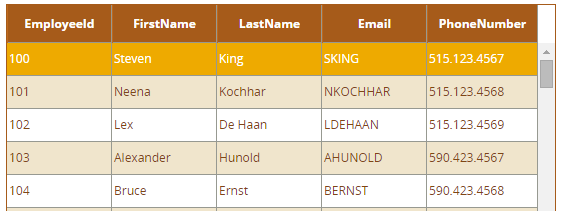
The below image is how the table look and feel after skinning.
The below are the steps to achieve above look and feel .
It's not straight forward approach, We need to apply skinning for each section.
af|table {
background: none;
border: 1px solid #A65B1A;
}
1. ColumnHeader:
af|table af|column::column-header-cell
{
height:35px;
color:#ffffff;
text-align: center;
font-size: 12px;
font-family:'OpenSans-Bold';
font-weight: bold;
background-image: none;
background-color: #A65B1A;
vertical-align: middle;
border-left: 1px solid #BF691E;
}
2. Data row:
af|table::data-table-VH-lines af|column::data-cell
{
background-color:#fff;
color: #7F4614;
font-size:12px;
font-family:'OpenSans-Regular';
height:30px;
vertical-align: middle;
text-align: left;
}
{
background-color:#fff;
color: #7F4614;
font-size:12px;
font-family:'OpenSans-Regular';
height:30px;
vertical-align: middle;
text-align: left;
}
3.Data row- Altrenative:
For implementing different css for alternative rows,we need to be change table rowBandingIntervel property to 1.
af|table::data-table-VH-lines af|column::banded-data-cell{
background-color:#F0E5CC;
color: #7F4614;
font-size:12px;
font-family:'OpenSans-Regular';
height:30px;
vertical-align: middle;
text-align: left;
}
4.Table default row selection:
Some of the requirements like want to show row selection color for the default selected row.
At the time of page load,The default row should selected, It depends on row index value.Normally, First row would be selected.
af|table::data-row:selected af|column::data-cell
{
background-color: #eeaa00;
color: #ffffff;
}
af|table::data-row:selected af|column::banded-data-cell
{
background-color: #eeaa00;
color: #ffffff;
}
Some of the requirements like want to show row selection color for the default selected row.
At the time of page load,The default row should selected, It depends on row index value.Normally, First row would be selected.
af|table::data-row:selected af|column::data-cell
{
background-color: #eeaa00;
color: #ffffff;
}
af|table::data-row:selected af|column::banded-data-cell
{
background-color: #eeaa00;
color: #ffffff;
}
5.Table row selection:
The row color will be changed based in your row selection.These are the following selectors for that.
af|table::data-row:selected:focused af|column::data-cell
{
background-color: #eeaa00;
color: #ffffff;
}
af|table::data-row:selected:focused af|column::banded-data-cell {
background-color: #eeaa00;
color: #ffffff;
}
6.Table row hover:
af|table::data-row:hover af|column::data-cell
{
background-color: #9bafc8;
color: #ffffff;
}
af|table::data-row:hover af|column::banded-data-cell {
background-color: #9bafc8;
color: #ffffff;
}
These all are the common requirements for table skinning.And we can also do skinninng for pagination and detail stamp.
Next post i am planning to post how the table support for responsive.This is the open issue for all developers.
Reach me if you have any doubts.

